Zscaler Client Connector • Z-Tunnel 2.0 • Field Notes
Turning it on takes a minute. Deciding what should not go through it is the project.
Part one
Decide
1. Why this is worth the effort
Every implementation costs something. Design time, testing time, troubleshooting time, change windows, documentation, internal alignment and, of course, money. So before enabling Z-Tunnel 2.0, the first question should not be “where is the checkbox?”. It should be: what does this actually buy?
Security implementations suffer from a perception problem. Cyber risk gets described as hypothetical, remote, unlikely. “What are the odds that this specific scenario happens to us?” is a normal reaction and not an unreasonable one.
The answer is roughly the same reason people buy car insurance. Nobody wakes up thinking “today a tree will fall on my car”. Most people still prefer having coverage before discovering that gravity, weather and bad luck held a meeting without inviting the insurance department. Security controls are not implemented because complexity is fun. They are implemented because prevention is cheaper than panic.
Tunnel 2.0 is one of those controls where the value is both technical and practical. It is a DTLS or TLS tunnel that captures and forwards endpoint traffic to the Zscaler cloud regardless of port or protocol, which is what makes Cloud Firewall, DNS Control, DNS inspection and IPS worth the licence they are printed on.
Field note: Tunnel 2.0 is not the goal. It is the path that lets traffic reach ZIA so the security services built around it have something to work with.
Visibility before protection
A firewall, an IPS engine or a DNS Control policy cannot protect traffic that never arrives. If an endpoint sends non-web traffic straight to the internet outside ZIA enforcement, that traffic is difficult to inspect, log and control. Tunnel 2.0 closes that gap by widening what reaches the platform.
Business outcome: not “we enabled Tunnel 2.0”, but “we increased visibility, centralized enforcement and made policy consistent regardless of where the user is sitting”.
Centralized policy
Rules live in one cloud management plane instead of a collection of distributed appliances with their own change windows.
Identity-aware control
Policy follows users and groups instead of being tied to IP addresses and locations that stopped meaning anything in 2020.
Less device dependency
Cloud enforcement reduces how much endpoint internet policy has to be expressed through physical hardware.
2. Documentation is necessary, and never complete
Even excellent documentation is an unfinished work. That does not make it wrong. It means it has a scope. A vendor guide must be readable, reusable and generic enough to serve many customers, many designs and many environments.
What it cannot describe is your tenant, your legacy VPN, your peculiar DNS dependency, your private endpoints, your application exceptions, and the one that only happens on Tuesdays when the user is on hotel Wi-Fi.
The vendor material gives the foundation: pilot groups, forwarding profiles, app profiles, Tunnel 2.0 configuration, correct bypass management, validation before broad rollout. An implementation guide has to go one step further and become a runbook.
- What was configured, and where.
- Why it was configured that way.
- What was excluded, and what was deliberately not excluded.
- How the client was validated.
- What evidence proves the configuration.
- Who owns each exception, and when it gets reviewed.
Field note: screenshots and field notes are not decoration. They are the bridge between “the product can do this” and “this is how it was actually done here”.
3. Tunnel 1.0 and Tunnel 2.0 are not two versions of the same thing
They are two forwarding models. Tunnel 1.0 forwards traffic through CONNECT requests, much like a traditional proxy, handling proxy-aware or port 80 and 443 traffic. It is also non-persistent: a tunnel is created on demand, per request. UDP, non-web TCP, ICMP and non-standard ports are simply not forwarded — they go direct, or they are blocked by whatever local policy exists.
Tunnel 2.0 uses DTLS or TLS and carries all ports and protocols. That is the whole difference, and it is a large one.
| Area | Z-Tunnel 1.0 | Z-Tunnel 2.0 |
|---|---|---|
| Transport | CONNECT requests, proxy-like | DTLS with TLS fallback |
| Persistence | Non-persistent, created per request | Persistent tunnel |
| Coverage | Proxy-aware or ports 80 and 443 | All ports and protocols, including UDP and ICMP |
| Non-web visibility | Effectively none | Strong |
| Cloud Firewall value | Limited | Strong |
| DNS Control value | Limited | Strong |
| Exclusion planning | Important | Critical |
More control requires more design discipline. That is not a slogan, it is the reason the rest of this article exists.
4. Three prerequisites nobody mentions until they bite
Packet Filter Based is not a preference
On Windows, the Tunnel Driver Type can be Route Based or Packet Filter Based. For Tunnel 2.0 this is not a design choice: Packet Filter Based is required. The Tunnel Version Selection field does not even appear until you select it, which is the product’s polite way of telling you the same thing.
With the filter driver, Client Connector does not create a virtual network adapter at all. It uses Windows filtering to capture and forward traffic, which gives more granular control and avoids interoperability problems with applications that like to manage network adapters themselves.
The NAT requirement
This one is easy to miss and expensive to discover. Tunnel 2.0 needs the NAT device in front of the endpoint to present a single IP address for all connections from that device.
If the NAT device spreads a single device’s connections across multiple public IPs, the control connection and the data connection can land on different Zscaler servers. Tunnel 2.0 fails to establish and the client silently falls back to Tunnel 1.0. Everything keeps working, which is exactly what makes it hard to notice.
Check this before the pilot, not during it. A rollout where half the users are quietly running Tunnel 1.0 produces test results that mean nothing.
The exclusions you already have
Tunnel 2.0 automatically excludes RFC 1918 private networks and the IPv4 multicast address space by default. You do not need to add your internal subnets by hand, and if you do, you are adding maintenance for behaviour you already had.
This also explains a category of behaviour that otherwise looks mysterious during testing, so it is worth knowing before you start writing exclusions to solve a problem that does not exist.
5. Do not let the bootstrap path depend on the forwarding path
Before configuring anything, look at how Client Connector reaches Zscaler during service discovery, enrollment, login, PAC retrieval and tunnel establishment. All of that has to happen before the tunnel exists.
This matters most when the endpoint sits inside a site already forwarding to Zscaler through a site-to-site IPsec tunnel. The target model can still be Tunnel 2.0 on trusted and off trusted, but the bootstrap traffic must not blindly ride the existing site tunnel. Otherwise the thing that has to come up first depends on the thing that comes up second.

Design rule: do not let the bootstrap path depend on the forwarding path.
| Traffic family | Recommended treatment |
|---|---|
| Service discovery | Keep independent from site IPsec where possible |
| Enrollment and login | Avoid dependency on the existing tunnel |
| PAC retrieval | Use a predictable local path |
| Tunnel and Service Edge traffic | Evaluate exclusion from site IPsec |
| Endpoint traffic once Tunnel 2.0 is up | Let Tunnel 2.0 policy control it |
The point is not to disable Tunnel 2.0 on trusted networks. The point is to avoid a circular dependency, and to keep Service Edge selection consistent with where the endpoint actually is rather than where the site tunnel terminates.
6. Define the target forwarding model
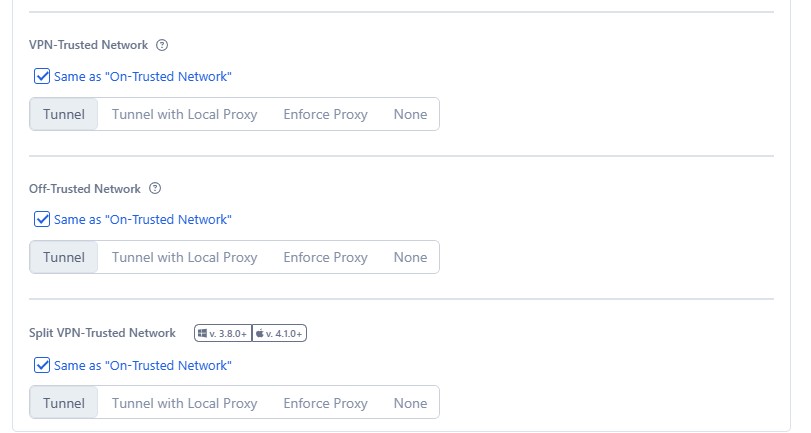
In this implementation model, Tunnel 2.0 is the preferred mode both on trusted and off trusted networks. The objective is a consistent posture regardless of where the user connects from, which also removes an entire class of “it works in the office” support tickets.
| Network state | Preferred behaviour | Design reason |
|---|---|---|
| Off trusted network | Tunnel 2.0 | Protect roaming users and apply consistent policy |
| On trusted network | Tunnel 2.0 | Same posture inside corporate sites, subject to the bootstrap rule above |
| VPN trusted network | Case-by-case validation | Avoid recursive routing and VPN conflicts |
| Restricted network | Tunnel 2.0 with fallback validation | Confirm DTLS behaviour and TLS fallback actually work |
Part two
Configure
7. Start with a pilot, not with production
A solid implementation starts small: identify a group, define Trusted Network Detection, create a dedicated Forwarding Profile, create or modify the App Profile, associate them, then validate before touching anyone else.
- Identify a pilot group.
- Define Trusted Network Detection criteria before forwarding behaviour.
- Create a dedicated Forwarding Profile for Tunnel 2.0 testing.
- Create or modify a Windows App Profile for the pilot group.
- Associate the Forwarding Profile with the App Profile.
- Validate on trusted and off trusted networks.
- Validate VPN scenarios and the bypasses they require.
- Validate DNS behaviour.
- Run it long enough to observe real user behaviour, not demo behaviour.
Field note: this is not bureaucracy. This is how the team avoids discovering at 9:05 on Monday morning that an undocumented application depends on a bypass nobody knew existed.
8. Trusted Network Detection: define the context first
Trusted Network Detection may look secondary when the target uses Tunnel 2.0 in every state. It is not. It defines the network context that everything else is evaluated against.
Trusted Network Detection answers “where is this endpoint connected from?”. The Forwarding Profile answers the next question: given that state, how should traffic be forwarded?
| Decision area | Recommended approach |
|---|---|
| Trusted network criteria | Prefer stable criteria such as DNS server and DNS search domains. |
| Hostname or IP checks | Use carefully. Name resolution can fail exactly during network transitions, which is when you need it. |
| Network state validation | Test on trusted, off trusted and VPN-connected states. |
| Troubleshooting evidence | Capture Client Connector logs and endpoint network details during validation, not afterwards. |
9. The Forwarding Profile
The Forwarding Profile determines what Client Connector captures and how it forwards, depending on the detected network state. Use a dedicated profile for the pilot before touching anything broad, and give it a name that says what it is.
Choosing the forwarding action
| Forwarding action | What it means | Typical use case | Consideration |
|---|---|---|---|
| Tunnel | Client Connector captures traffic and forwards it through the Zscaler tunnel. | The Tunnel 2.0 model. | Best fit for broad visibility and enforcement. |
| Tunnel with Local Proxy | Uses a local proxy listener, often with PAC logic. | Migration or coexistence. | Not the same broad native capture model. |
| Enforce Proxy | Enforces proxy behaviour. | Legacy proxy environments. | Poorly aligned with Tunnel 2.0 steering. |
| None | Disables ZIA forwarding for that state. | Very specific exceptions. | Inappropriate when consistent protection is the objective. |
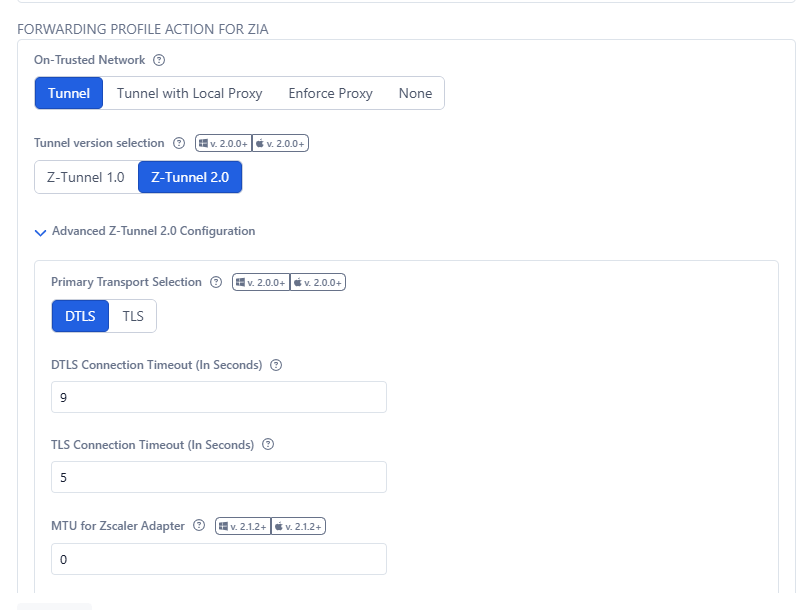
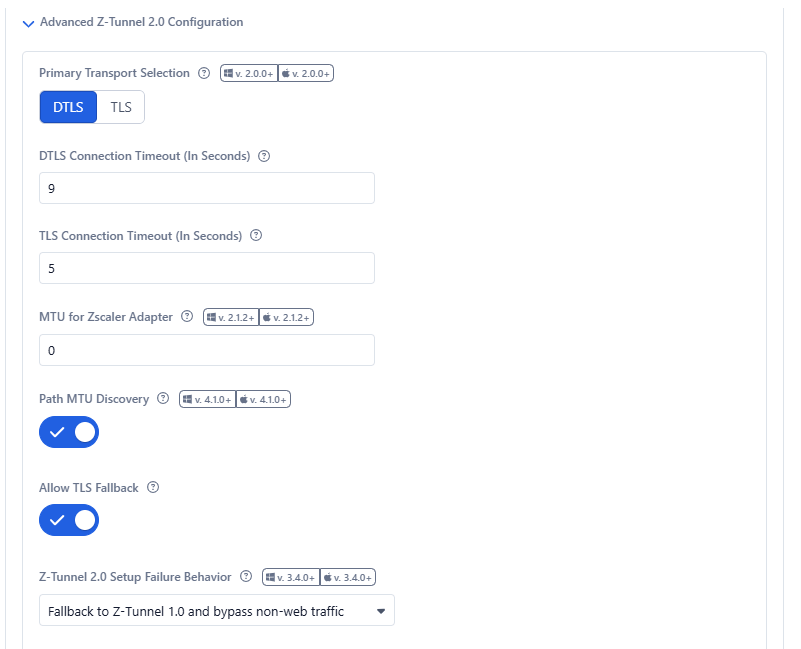
The advanced configuration defines the transport. DTLS is the primary transport, with TLS fallback enabled so the client still has a path when UDP is blocked, which on guest and hotel networks is most of the time.
10. The App Profile
If the Forwarding Profile decides how traffic is forwarded, the App Profile decides who receives that behaviour. It is also where most operational choices become real: rule order, group matching, profile association, PAC behaviour, VPN gateway bypass, IP bypass and DNS exclusions.
Validate it on the endpoint, not only in the portal. If rule order or group matching is wrong, the user receives a different App Profile and therefore a different Forwarding Profile, and every conclusion you draw from that test is wrong.
PAC and proxy behaviour
PAC settings still matter in a Tunnel 2.0 deployment, particularly where custom PAC logic influences forwarding. The App Profile can include options such as Use Preferred Port from PAC for Z-Tunnel 2.0.
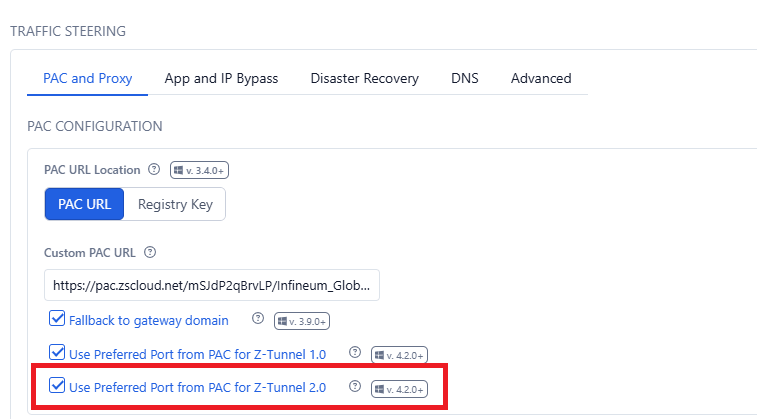
The goal is not to drift back to a PAC-centric design. The goal is that PAC decisions still worth keeping are honoured consistently.
11. Inclusions, exclusions and the order they are processed in
The Forwarding Profile enables the model. The bypass and exclusion behaviour lives in the App Profile, and this is where most implementations quietly go wrong.
For Z-Tunnel 2.0, network bypasses must be configured as VPN gateway bypasses or destination exclusions. Do not put them in the App Profile PAC file. That worked for Tunnel 1.0 and it will not work here, which is a fine way to spend an afternoon.
| Configuration area | Purpose |
|---|---|
| VPN Gateway Bypass | Highest-priority bypass, for VPN gateways and tunnel endpoints. |
| Destination Exclusions | Exclude specific IPs, subnets, protocols or ports from Tunnel 2.0. |
| Destination Inclusions | Include specific IPs or subnets in Tunnel 2.0. |
| Port-based bypass | Bypass a specific port or port range on Windows and macOS. |
| DNS Exclusions | Preserve internal or private DNS resolution paths. |
VPN Gateway Bypass, and why it wins
VPN Gateway Bypass is used when traffic to a VPN gateway must bypass Tunnel 2.0, typically to avoid recursive tunnelling. It has the highest priority for a concrete reason: it installs a kernel-level filter that discards matching traffic before Client Connector processes it at all. It is not evaluated alongside the other rules. It happens before them.
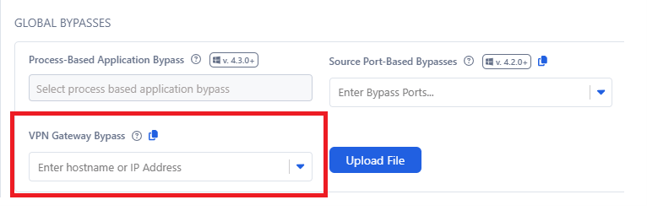
The field accepts FQDNs, and Client Connector resolves them every time it evaluates the bypass. Point it at something behind a CDN or CGNAT and you have signed up for continuous DNS churn. Use IP addresses and subnets wherever the destination allows it.
Processing priority
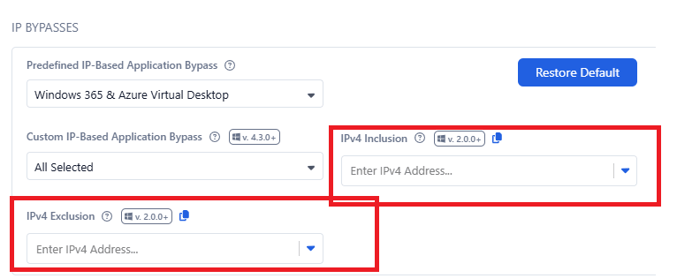
Bypass behaviour is not arbitrary. VPN Gateway Bypasses win over everything. Where exclusions and inclusions overlap, the more specific netmask wins. Where the masks are identical, the rule with more specificity in ports, port ranges and protocols wins. Where the two are genuinely identical, inclusion wins.
| Conflict scenario | Behaviour |
|---|---|
| A VPN Gateway Bypass matches | It wins, before anything else is evaluated. |
| Inclusion and exclusion overlap | More specific netmask wins. |
| Same subnet mask | More specific protocol or port match wins. |
| Inclusion and exclusion identical | Inclusion wins. |

Field note: “just add another exclusion” is dangerous troubleshooting. A new exclusion may not win if a more specific inclusion already applies, and you will spend the afternoon debugging a rule that was never in effect.
The allowlist pattern
There is an inverted model worth knowing. Put 0.0.0.0/0 in Destination Exclusions and the specific subnets you care about in Destination Inclusions. Only the listed subnets are tunnelled and everything else goes direct.
This is the opposite of the posture recommended in this article, so use it deliberately and for a stated reason, typically a phased migration or a narrowly scoped test. It is a useful tool and a terrible default.
Field note: if an exclusion has no owner, the exclusion is not an exception. The exclusion is an orphan.
12. DNS is not a side topic
DNS requests can be encapsulated in Tunnel 2.0 and sent to Zscaler trusted resolvers, while selected domains are excluded and resolved by the DNS server assigned to the endpoint adapter. For private resources, this is the whole ballgame.
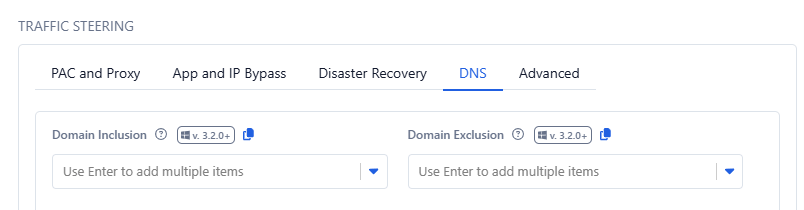
| Scenario | DNS handling |
|---|---|
| Public SaaS | Resolve through the standard path. |
| Internal corporate domain | Resolve through internal DNS. |
| Azure Private Endpoint | Resolve through the private DNS path. |
| Hybrid cloud private zone | Resolve through conditional forwarding or a private resolver. |
Prioritize DNS Exclusions over Z-Tunnel 2.0
This flag gives precedence to the entries in the DNS Exclusion field, and ensures they are honoured even when the DNS server configured on the network adapter has an address that is not covered by the IPv4 exclusion configuration.
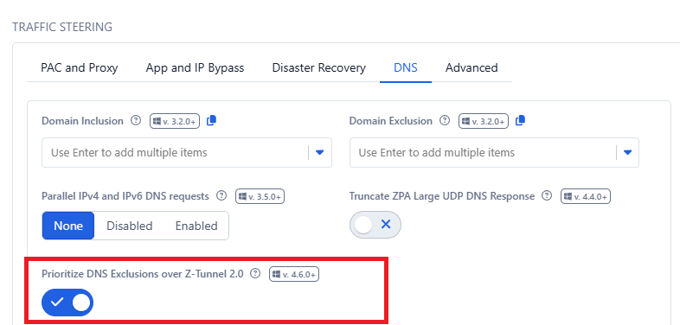
Operationally this matters in hybrid DNS, VPN and private endpoint scenarios. Without it, the client may not resolve selected private domains through the intended path, and the failure looks like an application problem rather than a DNS one.
Azure Private Endpoints
When public network access is disabled on an Azure resource, the application must resolve to the private endpoint address. There is no second path.
Here the DNS exclusion is not a workaround. It is the design. If the resource is private, the name has to resolve through the private path.
Which is also why a DNS exclusion should never be added because “the application does not work”. It should be added because the domain must resolve through a private or internal DNS path. Those are different sentences, and only one of them is a reason.
Field note: for private resources, DNS is the access path.
13. Teams and Zoom are real-time media, not web browsing
Real-time media is sensitive to latency, jitter and packet loss in a way that a web page is not. The decision here should be explicit and written down, because it is a genuine trade-off rather than a best practice.
| Decision | When to consider it | Trade-off |
|---|---|---|
| Tunnel the media | Strong centralized control is required | Possible quality impact |
| Bypass the media | User experience is the priority | Reduced visibility and inspection for those flows |
| Monitor with ZDX | You need experience visibility either way | Requires its own monitoring design |
Field note: if call quality is bad, users will not care that the policy design is beautiful.
Part three
Validate and operate
14. Rollout strategy
Phase 1: Pilot
Small technical group, dedicated Forwarding Profile, dedicated App Profile, logging and a feedback channel that people actually use.
Phase 2: Expansion
Add business users, test on and off trusted, validate VPN, DNS and UCaaS behaviour.
Phase 3: Production
Roll out by group or geography, monitor logs, document exceptions and brief the Help Desk before they find out from users.
Phase 4: Optimize
Remove exclusions that are no longer needed, tune Cloud Firewall, validate DNS policy and confirm the value actually landed.
15. Operational validation checklist
Client Connector
Forwarding and network state
Exclusions and bypasses
DNS
Security value
16. Common implementation mistakes
| Mistake | Impact |
|---|---|
| Enabling Tunnel 2.0 directly in production | Large blast radius, small amount of sleep. |
| Ignoring the NAT requirement | Silent fallback to Tunnel 1.0 and a pilot that proves nothing. |
| Leaving the driver on Route Based | Tunnel 2.0 is not selectable at all. |
| Not defining Trusted Network Detection first | Wrong network state evaluation everywhere downstream. |
| Letting bootstrap traffic depend on the site IPsec tunnel | Circular dependency and wrong Service Edge selection. |
| Confusing Forwarding Profile and App Profile | The wrong users receive the wrong behaviour. |
| Using PAC-based network bypass for Tunnel 2.0 | The bypass simply does not apply. |
| Adding broad exclusions to make a symptom go away | Permanent loss of visibility for a temporary problem. |
| Ignoring bypass priority | Traffic takes a path nobody designed. |
| Treating Teams and Zoom as normal web traffic | Poor call quality, loud feedback. |
| Resolving Private Endpoint FQDNs publicly | Application failures blamed on the tunnel. |
| Not documenting bypasses | Operational debt with compound interest. |
Final thoughts
Tunnel 2.0 is not a transport feature. It is a security enablement mechanism. It lets ZIA receive more traffic, inspect more traffic, classify more traffic and enforce more policy. The tunnel is only the means.
The value comes from the decisions around it: how forwarding profiles are structured, how app profiles are assigned, whether the bootstrap path is independent, how UCaaS media is treated, how DNS exclusions are governed, how private endpoints resolve, and who owns each bypass.
The goal is not to say “we enabled Tunnel 2.0”. The goal is to say “we increased visibility, centralized enforcement, reduced dependency on physical firewalls and made policy consistent regardless of where the user is”.
Security is rarely about preventing the event everyone expects. It is about being ready for the one people thought was unlikely.
Just like the tree that probably will not fall on the car. Until it does.
Sources and references
- Zscaler Help: About Z-Tunnel 1.0 and Z-Tunnel 2.0
- Zscaler Help: Best Practices for Deploying Z-Tunnel 2.0
- Zscaler Help: Best Practices for Adding Bypasses for Z-Tunnel 2.0
- Zscaler: Optimizing Traffic Forwarding for Managed Devices
- Zscaler Help: Using the Windows Filter Driver for Zscaler Client Connector.
- Zscaler Help: Configuring Forwarding Profiles and App Profiles for Zscaler Client Connector.
- Zscaler Help: Trusted Networks and trusted network criteria.
- Zscaler Config: Client Connector service discovery, enrollment, login, PAC and Service Edge destinations.
- Microsoft guidance on Teams proxy bypass and the shortest direct path to Microsoft 365.
- Zoom guidance on real-time media routing and avoiding deep packet inspection for media streams.
- Microsoft Azure documentation on Private Endpoint DNS resolution.
- Figures 1 and 2: original Zero Trust Navigator diagrams. Figures 3 to 10: implementation screenshots, sanitized.