ZIA Authentication Part Two • Policy for Unauthenticated Traffic • Field Notes
The categories in that menu are not accounts. They are the names of the ways attribution can fail.
Where this picks up
Part One covered when ZIA stops knowing who you are: three carriers of identity, and five documented ways of removing the middle one. What it did not cover is the practical question, which is also the one that causes the most trouble in projects. Now what?
The instinct is to treat unauthenticated traffic as a fault to be eliminated. Almost always it is not. It is a category to be governed — devices that cannot authenticate, applications that break if you make them try, server egress with no identity to present in the first place.
ZIA gives you a precise vocabulary for this, and almost nobody uses it. In large part because the name of the feature misleads.
Note on scope: this article is descriptive rather than prescriptive. It sets out what each mechanism does and what it depends on. What the right design is for your environment depends on things no article knows.
Part one
The vocabulary, and what limits it
1. The default that surprises people
Before the vocabulary, an observation about what happens when you do nothing — because the answer differs depending on how your policy is written, and it is wrong in both cases.
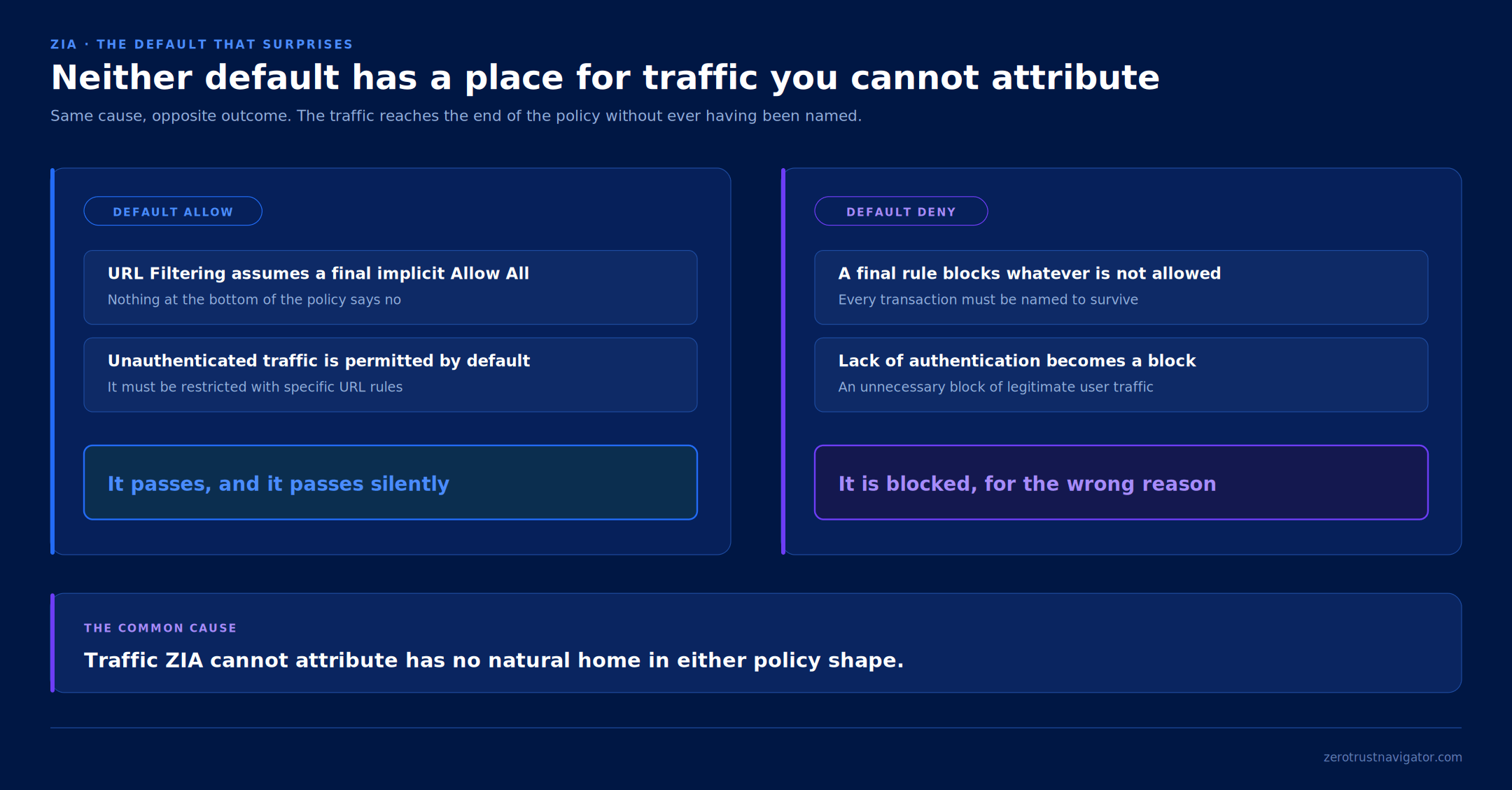
If the organisation runs on default allow, the authentication deployment guidance is explicit: URL Filtering assumes a final implicit Allow All, so unauthenticated traffic is permitted by default and has to be restricted with specific URL rules. Traffic you cannot attribute passes, and it passes quietly.
If the organisation runs on default deny — a final rule blocking whatever is not explicitly allowed — the documentation on policies for unauthenticated traffic describes the opposite problem: the lack of authentication leads to an unnecessary block of user traffic.
Two opposite outcomes, one cause. Traffic ZIA cannot attribute has no natural home in either policy shape: it either slips past the controls or gets blocked for a reason that has nothing to do with security.
2. Seven classes, not seven people
Here is the misunderstanding that gives this article its title.
Once you enable the feature, a group called Special Users appears in the policy menus, next to General Users. It looks like a set of unusual accounts. It is not. These are classes of traffic, one for each distinct reason attribution failed. Selecting one means: this rule applies to traffic that failed authentication in this particular way.
| Class | What it collects |
|---|---|
| Unauthenticated User Agent | the user agent cannot be authenticated by the configured method |
| Unsupported Method | HTTP methods not normally supported, such as FIND or PROPBIND |
| Unauthenticated Protocol | not authenticable by the configured method — the example given is undecrypted HTTPS |
| Unauthenticated Proxy Port User | traffic arriving on port 9480 |
| Authentication Bypass URL | exempted URLs and cloud apps — and CONNECT and OPTIONS requests |
| Unknown Kerberos User | traffic from a Kerberos user the service does not know |
| Miscellaneous Unauthenticated Transactions | anything that fails for miscellaneous reasons |
If you read Part One, four of these are recognisable as the reverse side of the five conditions: the unknown user agent, undecrypted HTTPS, the exemptions, the CONNECT method. The taxonomy is finer than that list, though. It adds anomalous HTTP methods, the unknown Kerberos user and the listening port — none of which appeared in the cookie list, because none of them are about cookies.
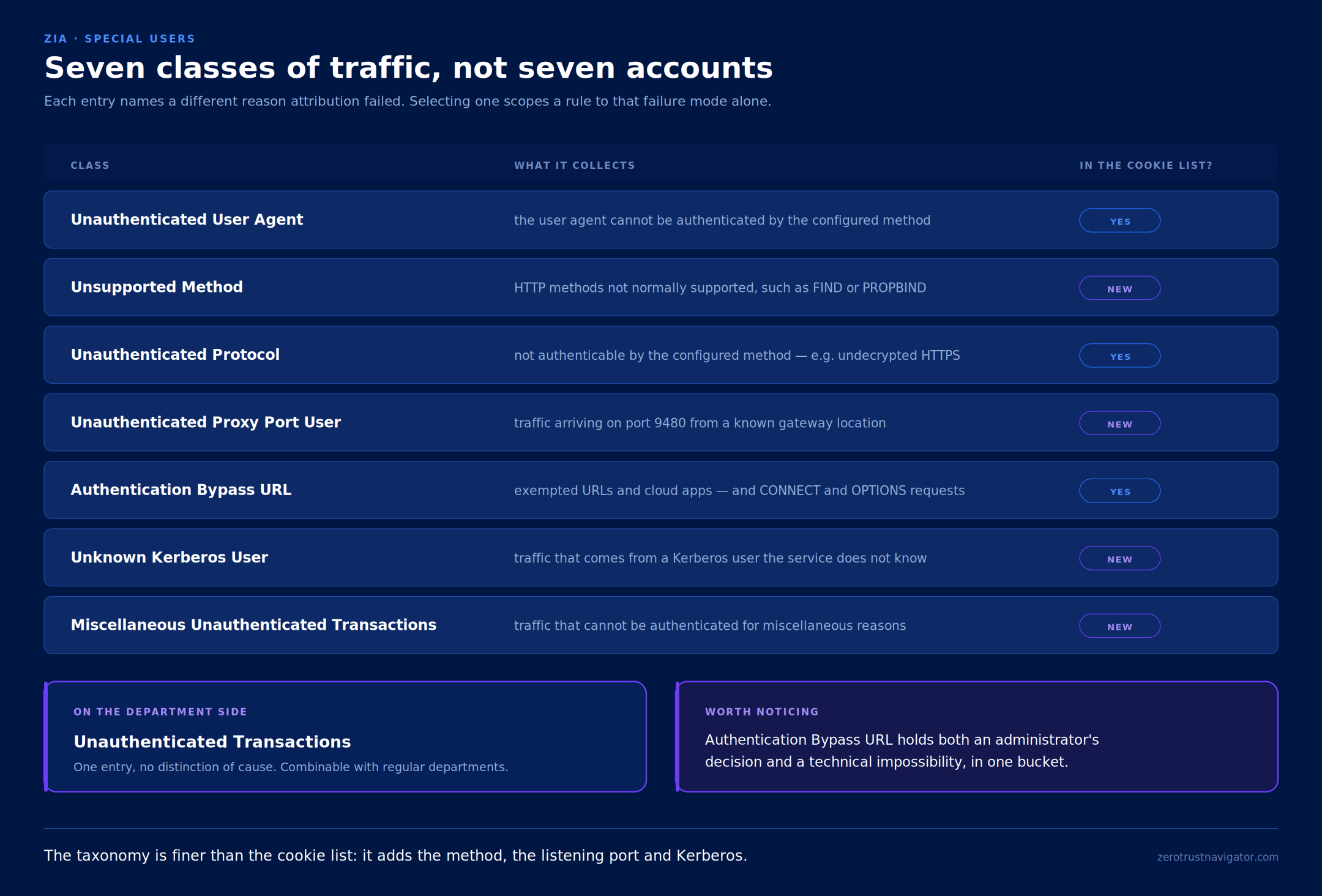
One detail is worth pausing on, because it reshuffles a distinction Part One drew cleanly. The Authentication Bypass URL class holds both the exemptions an administrator configured and the HTTP requests that cannot support cookie authentication, such as CONNECT and OPTIONS. A technical impossibility and a deliberate decision, in the same bucket. If you need to tell them apart, the class will not do it for you and you have to look at the destination.
On the department side the instrument is much blunter. Under Special Departments there is a single entry, Unauthenticated Transactions, which covers any unauthenticated traffic without distinguishing the cause. It can be combined with regular departments, which makes it convenient as a closing rule.
3. The constraints that bite
The feature is not on by default. It is enabled under Policies > Common Configuration > Advanced > Advanced Settings, in the Policy for Unauthenticated Traffic section, with the Enable Policy For Unauthenticated Traffic switch. Until you turn it on, those categories do not appear in the menus at all.
Then there are three constraints that shape the design, and the first is what I would call the paradox of this feature.
The feature applies only to locations that have authentication enabled.
Read that alongside Part One. On a location with Enforce Authentication switched off — the situation where most traffic goes unattributed, and therefore where these rules would seem most useful — they are not available. The Special User classes never come into play. What remains are rules with no user criteria at all.
Anyone who arrives at this feature by following the symptom finds a closed door precisely where the symptom is loudest.
The second constraint is the mirror image of the first, and it lives in Advanced Settings: a rule that applies to unauthenticated traffic must apply to all locations. You cannot write one and then select particular sites. It is all or nothing on geography.
The third is procedural, and it costs afternoons. If you scope the rule to unauthenticated traffic through the Users or Departments criteria, do not select a Group. And the general evaluation rule applies throughout: a criterion left empty is simply ignored.

Part two
Declaring what a site carries
4. What Location Type actually does
Before the scenarios, a piece of vocabulary almost everyone fills in quickly and then forgets.
Every location has a Location Type, and it is mandatory — the documentation explicitly warns you to set a value both when creating a location and when editing an existing one. The values are Corporate user traffic, Guest Wi-Fi traffic, IoT traffic, Server traffic and Extranet. Sublocations add Workload traffic type, which is applied automatically to sublocations of locations created from the Cloud & Branch Connector portal.
The useful question is what the field actually does.
Mostly, it groups. Selecting a type assigns the location automatically to a corresponding predefined location group — the Workload Traffic Group for the Workload traffic type, for instance. The Dynamic Location Groups field populates itself and is not editable. And the Exclude from Dynamic Location Groups option acts only on user-defined dynamic groups: turning it on does not affect the association with the predefined ones.
That is not nothing, because location groups are a policy criterion. Typing a site is how future rules will find it without naming it. But it is a classification function, not an enforcement one.
With three documented exceptions, which are the reason this section exists:
- JWT is not supported for the Extranet and IoT Traffic location types.
- The Authentication feature is not supported on Workload traffic sublocations.
- Selecting Extranet changes the configuration steps, and the Extranet sublocation type is only available — and automatically assigned — for extranet locations.

Outside those, the documentation gives Location Type no effect on authentication or on user attribution. That is worth stating explicitly, because the opposite temptation is strong: find a site typed IoT traffic carrying unattributed traffic and conclude that the type caused it. There is no documented basis for that link. The cause is in the carriers, as in Part One.
There is still a design hygiene point. A location carrying corporate Client Connector users but typed as IoT traffic lands in the wrong dynamic group, and any future rule written by group will either miss it or catch it by mistake. The field breaks nothing today. It breaks the policy somebody writes six months from now.
Part three
The scenarios, and how the settings interlock
5. Corporate and guest on the same tunnel
This is the canonical scenario, and the sublocation documentation uses it as its worked example: define one sublocation for the corporate network and another for the guest network, even though both go through the same GRE or IPSec tunnel. Among the listed benefits is, literally, enforcing authentication on the internal corporate network while disabling it for the guest network.
It works because Enforce Authentication is configurable per sublocation, not only per location. Sublocations are defined by ranges of internal addresses, which is exactly how the two networks are already separated.

Three cautions, all documented, all capable of ruining a change window.
Sublocations cannot have overlapping IP addresses within the same location. The same address can, however, exist in different locations.
When you add the first sublocation, the service automatically creates one called other, for addresses that arrive from the location but fall outside any defined sublocation. With IPv6 enabled, an other6 appears alongside it.
And here is the heavy one: every policy rule that referenced the parent location now references the other sublocation, and rules for the sublocations you actually created have to be configured by hand. This is not cosmetic. It is a migration of references that happens the moment you save, and on a production location it needs sequencing.
Finally, a scope limit worth knowing before you design around it: the Authentication feature is not supported on Workload traffic sublocations, and JWT is not supported for the Extranet and IoT Traffic location types.
6. Server egress and headless traffic
A server has no identity to present. It holds no cookies, follows no redirect, has no user session behind it. The documented way to handle that is the listening port.
Public Service Edges accept web requests on ports 80, 443, 9400, 9480 and 9443, and traffic generated from a known gateway location and destined for 9480 bypasses authentication by design, classifying itself as Unauthenticated Proxy Port User — the class from the table in section two.

There is a counterintuitive behaviour worth reporting, and I write it carefully because it appears in a knowledge base article rather than in the product documentation: servers behind GRE or IPSec using the proxy FQDN on 443 may receive credential prompts even where the location has Enforce Authentication disabled.
If that is the behaviour, the explanation fits the three-carrier model from Part One neatly. The location setting governs traffic in transparent mode; explicit proxy traffic on standard ports follows ordinary authentication behaviour. It is a case worth verifying on your own tenant before building around it.
7. Devices and applications that cannot authenticate
Devices with no credentials to give
For printers, sensors, OT equipment and unmanaged devices there is a dedicated path at location and sublocation level. Enable IoT Discovery discovers IoT and OT devices, servers and unmanaged devices, and underneath it Enforce IoT Policy Control enforces URL Filtering and Cloud App Control rules on the unauthenticated traffic from IoT devices at that location. Both options appear only if the corresponding features are enabled for the organisation.
It is the clearest illustration of this article’s principle: you do not try to authenticate what cannot authenticate. You declare what it is and govern it as that.
Applications that break when you ask
Some clients and sites do not support cookie-based authentication, or do not respond to the HTTP 307 redirect the service uses to send them off to authenticate. The documentation names some Microsoft 365 applications as an example, and suggests a practical way to find the offending URL: capture the traffic with tools such as Fiddler or Wireshark.
The configuration lives in Advanced Settings, in the Authentication Exemptions section, with three fields: Exempted URL Categories, Exempted URLs and Exempted Applications.
Two details rarely found summarised together. First: exemptions apply only to traffic originating from known locations, excluding those created with a dedicated proxy port — so they do not cover remote users. Second, and more consequential for design: the exemption lists are per authentication method. There is one for cookies, one for Kerberos, one for Basic, one for Digest and one for JWT. There is no single auth bypass list, and configuring one does not exempt from the others.
What you exempt here is what you find in the logs under Authentication Bypass URL. The configuration and the taxonomy are two ends of the same wire.
8. Recovering identity instead of giving it up
When the goal is not to govern anonymous traffic but to attach it back to a user, the instrument is IP Surrogate. It maps a user to a private IP address so the service can apply that user’s policies rather than the location’s to traffic it cannot authenticate — with the documentation naming applications that do not support cookies, undecrypted HTTPS transactions and unknown user agents.
The constraints are the ones that derail projects in the field, and they are worth checking before promising it to anybody:
- forwarding must be a GRE or IPSec tunnel without NAT, or proxy chaining with XFF turned on, or a dedicated proxy port;
- the location or sublocation must have Enforce Authentication enabled;
- the mapping is one to one and temporary: it ends when the idle time expires, when the user logs out, or when another user sends authenticated transactions from the same private IP;
- there is anti-flapping protection: if the mapping changes more than three times a minute, the service stops mapping that address for five minutes and applies location policies instead;
- multi-session VDI is not recommended, because every user on the same virtual machine shares the private address and transactions end up attributed to the wrong person.
On timers, two explicit recommendations. The Refresh Time for re-validation of Surrogacy must be shorter than the DHCP lease time, otherwise the wrong user policies may be applied — and Zscaler recommends keeping it shorter than the Idle Time to Disassociation as well.
Finally, if you enable Enforce Surrogate IP for Known Browsers, you have to choose in Supported Authentication Methods between Cookie and Cookie and Proxy. The second avoids additional challenges after the initial one; the first requires every other method to authenticate on each request. And if you use Basic Authentication, Cookie and Proxy is mandatory for surrogacy to work at all.
Part four
Dependencies, degradation and triage
9. The dependency matrix
Put together, the interactions look like this. It is the page most people will want to keep.
| To use | Requires | Does not work if |
|---|---|---|
| Policy for unauthenticated traffic | the Advanced Settings toggle, and a location with authentication enabled | the rule is scoped to selected locations |
| Special Users and Departments | the feature above | — |
| IP Surrogate | Enforce Authentication on, and GRE or IPSec without NAT, XFF, or a dedicated port | the tunnel is NATted, or the environment is multi-session VDI |
| Digest, Basic, Kerberos, JWT | Enforce Authentication on | the location type is Extranet or IoT Traffic (JWT) |
| Caution and AUP notifications | Enforce Authentication off | authentication is enabled on that location |
| Authentication exemptions | traffic from a known location, and a list maintained per authentication method | the user is remote, or the location uses a dedicated proxy port |
| Port 9480 unauthenticated egress | a known gateway location | the client uses 80, 443, 9400 or 9443 |
| Enforce IoT Policy Control | IoT Discovery on, and the feature enabled for the organisation | — |
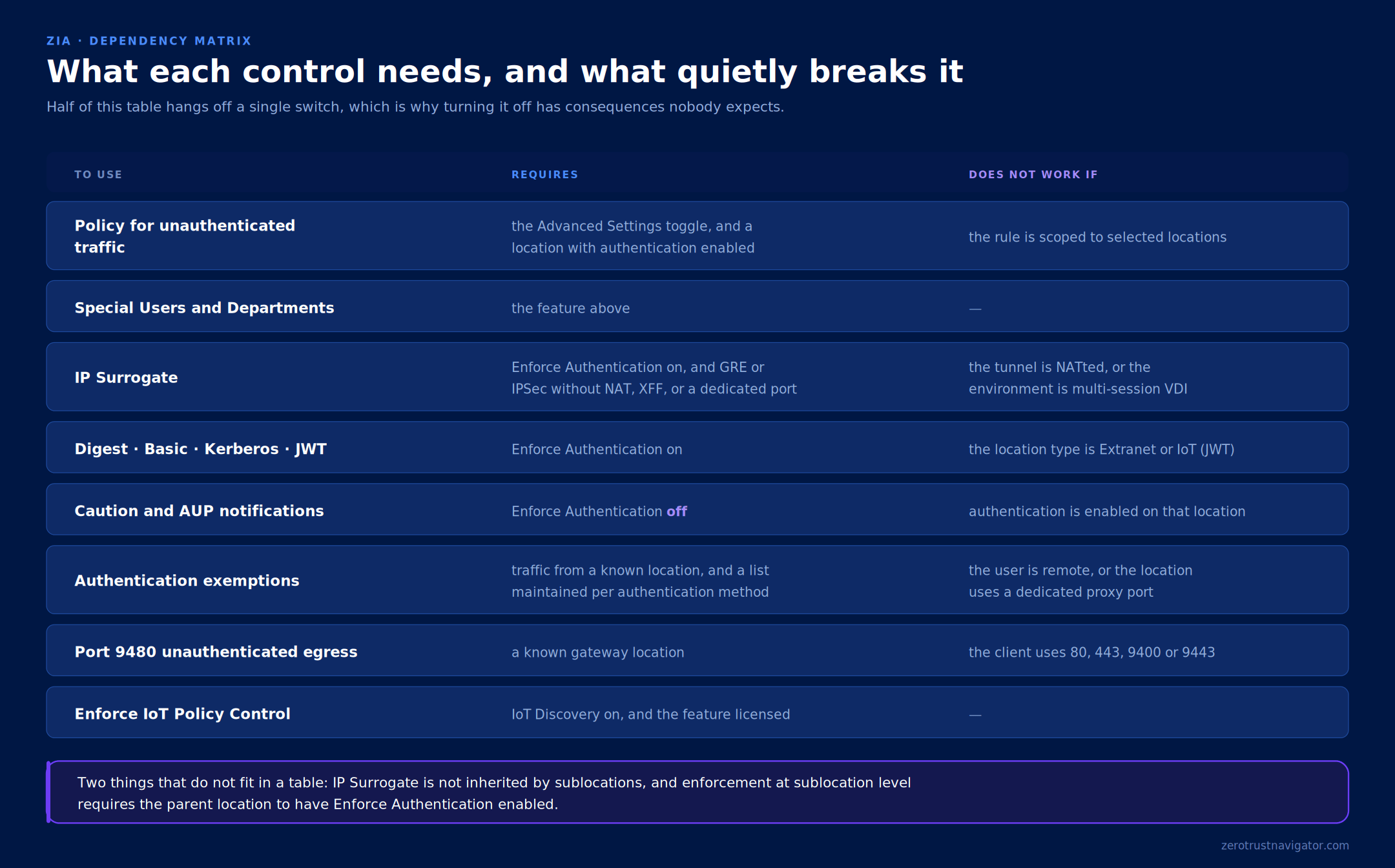
Two things that do not fit in a table. IP Surrogate is not inherited from a location by its sublocations. And, per guidance received from Zscaler support, enforcement at sublocation level requires the parent location to have Enforce Authentication enabled.
10. When the control plane degrades
There is one last scenario, rare but instructive, in which traffic becomes unattributed without anybody having configured anything.
When a session arrives at a Service Edge, enforcement requires that Service Edge to hold the organisation’s full configuration, downloaded from the Central Authority. In rare cases — transient latency or disruption — it may be operating with a partial configuration. The Behavior When Partial Configuration Available setting defines what happens then, with three modes: Fail Open, the default, where policy evaluation is skipped and the traffic passes; Fail Closed, where traffic is blocked unless a complete configuration is available; and Best Effort Policies, where the most specific rules available are applied by falling back on a previously acquired configuration.
The third is the interesting one, because it reuses this article’s vocabulary as the system’s own fallback state: it falls back to a global location called Org Default and a generic user type called Miscellaneous Unauthenticated Transactions — the same class that appears among the Special Users.
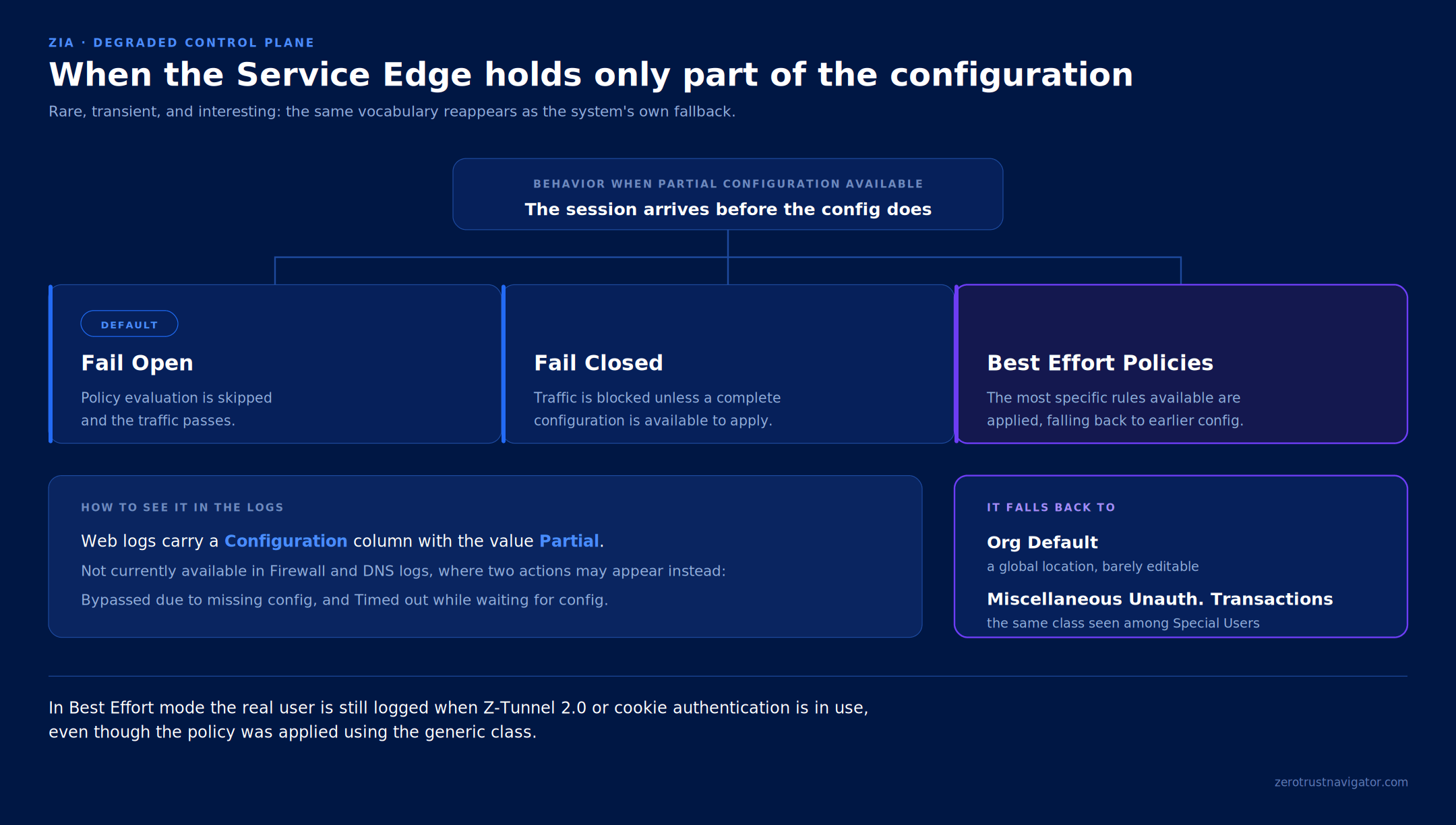
To use the mode properly you have to add Org Default and Miscellaneous Unauthenticated Transactions to any rule that carries explicit location or user criteria; rules matching any location or user pick them up automatically. Org Default is visible on the Locations page but editable only for Enforce Firewall Control and Enable IPS Control, and it does not support sublocations. The Miscellaneous user is visible only in rule conditions and is not editable. And you can only leave Best Effort mode once no rule references either of them.
In the logs, the distinction reads in the Configuration column, which carries the value Partial. That column is not currently available in Firewall and DNS logs, where two actions may appear instead: Bypassed due to missing config and Timed out while waiting for config. Worth knowing: in Best Effort mode the real user is still logged where Z-Tunnel 2.0 or cookie authentication is in use, even when the policy was applied using the generic class.
11. Reading a symptom
A triage matrix to close on, with no prescriptions: the symptom, and the first place worth looking.
| Symptom | Look here first |
|---|---|
| The User field holds a location name | which of the three carriers was meant to work on that traffic |
| Special Users do not appear in the menus | the toggle in Advanced Settings |
| They appear, but the rule never matches | is authentication enabled on that location, and is the rule scoped to sites |
| An application breaks only with authentication on | which method is in use, and the exemption list belonging to that method |
| IP Surrogate maps nobody | NAT on the tunnel, and Enforce Authentication on the location |
| IP Surrogate maps the wrong user | refresh time against the DHCP lease, and shared multi-session VDI |
| Rules that referenced a location stop matching | a sublocation was added, and the references moved to other |
| Sporadic transactions under a generic user | the Configuration column in the web logs |

Final thoughts
Unauthenticated traffic is not a configuration defect. It is the normal condition of part of any network: the devices with no credentials, the applications that break when you ask for them, the servers with no human session to present.
ZIA offers a vocabulary for telling those cases apart — seven classes, not one — and the fastest way to waste it is to treat them as though they were users. They are not. They are the names of the ways attribution can fail, which is why reading them requires having understood first how identity travels.
Traffic you cannot attribute gets governed either way. The question is whether you meant to.
Two threads in this article are still open. The behaviour of explicit proxy traffic on port 443 where the location has authentication disabled comes from a knowledge base article rather than product documentation, and the sublocation guidance about the parent location came from a support case rather than a published page. Both are worth verifying before a design depends on them, and both will be revisited if what comes back changes the picture.
Sources and references
- Zero Trust Navigator — The Location Is Not a User: How ZIA Decides Who Sent the Traffic (Part One)
- Zero Trust Navigator — The Padlock Is Not a Promise: TLS Inspection and the Controls That Depend On It
- Zscaler Help — Configuring Policies for Unauthenticated Traffic
- Zscaler Help — Configuring Advanced Settings
- Zscaler Help — Exempting URLs and Cloud Apps from Authentication
- Zscaler Help — About Locations
- Zscaler Help — Configuring Locations
- Zscaler Help — Understanding Sublocations
- Zscaler Help — Configuring Sublocations
- Zscaler Help — Understanding Surrogate IP
- Zscaler Help — Understanding Zscaler Cookies
- Zscaler Help — Authentication Deployment and Operations Guide
- Zscaler Help — What constitutes unauthenticated traffic, how to monitor it, and how to configure unauthenticated server egress (port 9480)
- Figures 1 to 9: original Zero Trust Navigator diagrams.
Behaviour described here follows Zscaler’s published documentation except where explicitly noted otherwise. Product behaviour changes; verify against current documentation before relying on any of it in a design.