ZIA DNS Control Part Two • Policy and Configuration • Field Notes
The rule you write on the DNS plane does not compete with the one on the web plane. It runs before it, and it can silence it.
Where this picks up
Part One was about the resolution path: who answers a query, through which route, and what each forwarding model leaves you able to write policy on. It stopped deliberately at the point where the configuration begins.
This part starts with the question everyone asks as soon as both policy screens are open in the same browser. If DNS Control can block a domain and URL Filtering can block the same domain, why are there two of them, and which one should the rule live on? Answering that first makes the rest of the configuration obvious. Answering it last produces a tenant with the same intention written twice, in two places, with two different failure modes.
Note on scope: this article is descriptive rather than prescriptive. It sets out what each mechanism does and what it depends on. What the right design is for your environment depends on things no article knows.
Section one
Where the decision belongs
1. Two transactions, not two ways of writing one rule
The reason the two policies are not interchangeable is that they do not act on the same thing. A name resolution and a web session are two separate transactions, and the first one is finished before the second one begins.
The DNS transaction is a question and an answer. What the service can see is the name that was asked for, the record type, the address that came back, and where the request came from. That is all of it, and it is over in two messages.
The web transaction is everything after: a connection, a handshake, a request, a response. What the service can see there is the full URL, the method, the payload, the file type and, where authentication worked, the person. It is a far richer picture, and it only exists if the traffic reaches the proxy at all.

2. Which plane does the decision belong to?
Once the two transactions are separated, the choice stops being about which control is stronger and becomes a question about evidence and reach. A few statements decide it faster than a discussion does.

The DNS plane earns its place in four situations that the web plane cannot cover by construction. When the requirement is that a population must not reach a class of destination on any protocol, not only over HTTP. When the devices concerned never reach the proxy. When the rule has to act on a record type or on a tunnel rather than on a destination. And when the address that came back matters as much as the name that was asked for.
The web plane wins everywhere the decision depends on detail the DNS exchange never carries: a path, a method, a file, an action inside an application. It also wins whenever the person stopped has to understand why, which is a bigger operational point than it sounds and gets its own section later.
Both planes can block the same site. Only one of them can explain itself, and only one of them still applies to a printer, a workload or a guest.
3. What a DNS block actually removes
Here is the part that turns a filtering decision into an architectural one. A block on the DNS plane is not an additional layer of defence for a category. It is the removal of every layer underneath it.
If the name never resolves, there is no session. With no session there is no URL Filtering evaluation, no Cloud App Control, no isolation, no caution page, no acceptable use notification, and no per-group exception. All of those are rules about a transaction that no longer takes place.

The concrete case worth carrying into a design review involves the Miscellaneous super category. Blocking it on the request side is a documented recommendation, and it is a reasonable one on its own terms. It is also, in many tenants, the category being sent to browser isolation precisely because it is unclassified and therefore uncertain. Enable both and the isolation policy never fires again, because the browser never gets an address to connect to.
Nobody reports this. There is no block page, no isolation session and no log line on the plane being watched. Decide the DNS category list against the web policy that already exists, not against the recommendation list on its own.
Section two
Building it in the right order
4. NAT Control and DNS Control are not alternatives
DNS Control lives inside the firewall module, alongside Firewall Filtering and NAT Control. Where it sits in the overall order of enforcement is covered in You Are Not Buying Nine Products and there is no reason to repeat it here. What that article does not cover is the relationship between two tabs of the same module, and that relationship is where most of the confusion in real deployments sits.
NAT Control answers one question: where is this query allowed to go, and who ends up answering it. The predefined rule sends port 53 to the trusted resolver. A DNS gateway can be named instead. A higher-ranked rule, scoped by source, can let internal resolvers transit their iterative queries. None of that decides whether the exchange is acceptable.
DNS Control answers the other question: is this exchange permitted, and what does the client receive back. Requested and resolved categories, record types, tunnels and network applications, and an action. It is evaluated in rule order and the first match ends the evaluation, exactly as in the rest of the module.

5. The build sequence
The steps below are not a checklist of screens. Each one is a prerequisite for the next, and the two that usually get done first are the two that belong at the end.
- Location. Firewall control enforced on the location or sublocation. Without it nothing that follows applies.
- Firewall filtering. A rule that allows the DNS network service. The recommended rule covering DNS, HTTP and HTTPS is the usual candidate.
- NAT Control. The predefined rule for the trusted resolver present and enabled. This is what actually hands the query to the resolver.
- Transit rule. Only where internal resolvers are meant to keep resolving iteratively, ranked above the predefined one and scoped by source address.
- Verify. Resolve a name from a client and confirm which server answered. This is the proof that the path works.
- DNS Control. Now, and only now, the filtering rules.
- Watch. DNS Insights before tightening anything further.

Adding filtering rules before resolution is proven turns a working path and a broken policy into one indistinguishable symptom. Somebody will spend an afternoon debugging a rule that was never reached.
6. Anatomy of a rule
The criteria describe a question. The actions decide what the client is told. Both lists are longer than most people expect, and the second one is where the interesting decisions live.
| Action | What the client experiences |
|---|---|
| Allow | The request and the response pass. |
| Block | Silence. The request and the response are dropped with nothing returned. |
| Block with Response Code | A response code of your choosing is returned instead of an address. |
| Redirect Request, keeping the sender protocol | The query goes to the DNS gateway you name, over the protocol it arrived on. |
| Redirect Request using DoH, TCP or UDP | The query is sent to the gateway over the protocol you choose, which the gateway must support. |
| Redirect Response | The resolved address is replaced before the answer reaches the client. |
| Resolve by ZPA | Private application names are resolved for Private Access. |

Two notes that save time later. Every redirect action names a DNS gateway, and the gateway has to support the protocol the action uses, so the list of selectable gateways changes with the action. And the choice between silence and a response code is not cosmetic: a silent block leaves the client retrying and the user describing a slow application, while a response code at least ends the attempt cleanly.
Licensing. DNS gateways, protocol translation and the resolver high-availability features sit in the Advanced Cloud Firewall tier, and the granular user-level rules are generally described as belonging there too. Check the entitlement against your own order before designing around the redirect actions.
7. The rules you did not write
Before writing anything, it is worth reading what the tenant is already doing. Several predefined rules exist, some of them are enforcing right now, and two of them cannot be edited at all.
| Rule | Action | What to know |
|---|---|---|
| ZPA Resolver for Locations and for the Road Warrior | Redirect | Leave them at the top. Source IP anchoring for private applications depends on them. |
| Critical Risk DNS Tunnels | Block | Enabled by default. Covers the tunnels classified as commonly blocked. Criteria and action are read-only. |
| High-Risk DNS Categories | Block | Enabled by default. Newly registered and observed domains, newly revived domains and other security, on both the request and the response side. Read-only. |
| Unknown DNS Traffic | Configurable | Malformed queries, non-standard DNS and non-DNS traffic on port 53. The recommended action is block. |
| Default Firewall DNS Rule | Configurable | Changing it to block requires an allow rule above it, or resolution stops for everything not explicitly permitted. |
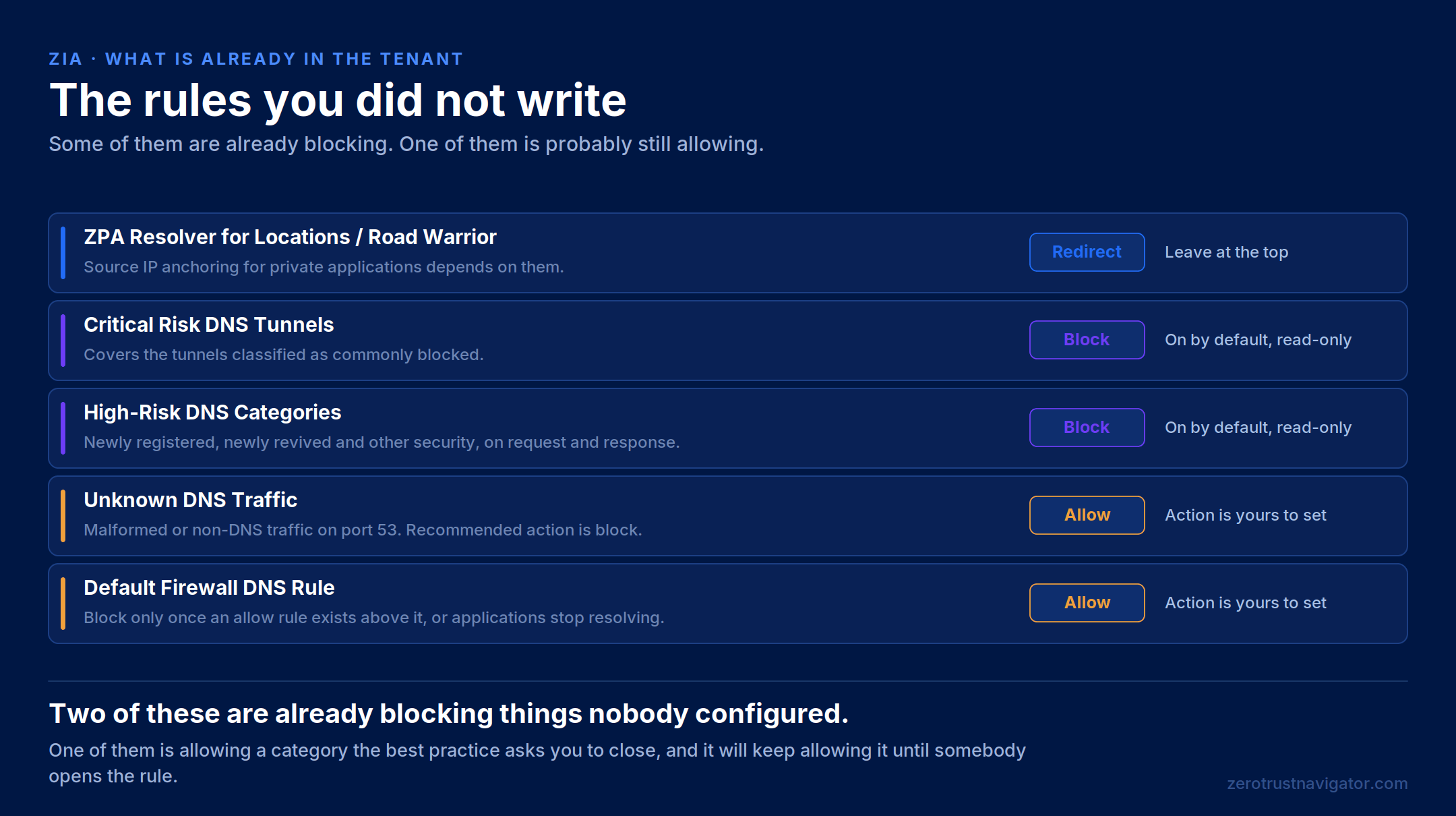
A tenant that has never had a DNS policy written in it is not a tenant with no DNS policy. It is a tenant with a default one that nobody chose and few people can describe.
Section three
What is worth enforcing
8. What blocking DNS tunnels actually means
A DNS tunnel does not carry arbitrary traffic. It hides a payload inside legitimate record formats, TXT, AAAA and MX among them, a few bytes at a time, and a tunnel client on the inside talks to a tunnel server on the outside through the channel that results.
The reason it works is not a weakness in any single component. The compromised device asks a question. The corporate resolver forwards it, because forwarding questions is what it is for. The recursion chain delivers it to the name server that is authoritative for a domain the attacker owns, and the answer comes back the same way. Every hop behaves exactly as designed, and no firewall rule is violated at any point.

Three uses of that one channel are worth keeping distinct, because they are noticed in different ways. Bypassing the organisation’s own DNS controls, typically by reaching an outside resolver. Command and control to systems already compromised. And exfiltration, in messages small enough that no single one looks like anything.
Three classifications, and where the line gets drawn
Detection here is not a downloaded list. The service proxies the DNS traffic and logs it, the logs feed an engine that scores the risk of a domain and classifies it, and the classification is propagated to every Public Service Edge. From that point the proxy acts according to your policy.

The three classifications are commonly allowed, mostly traffic from security services; commonly blocked, the denylist; and unknown, the graylist of tunnels not yet classified and judged potentially malicious. The predefined rule covers the second one. The best practice asks for the second and the third, and treats the first as optional on the grounds that those services generally have more standard ways to communicate.

A tunnel built for one target has never been seen anywhere else. It is unknown by definition, which makes the graylist the category that matters and the one no predefined rule turns on for you.
In the deployment these notes come from, the two predefined rules were already enforcing and the graylist was enabled deliberately afterwards. That order is worth stating, because the second decision is the one that carries operational risk: a category defined as not-yet-classified will occasionally contain something legitimate that nobody has got round to classifying.
The block is silent, so nobody reports being blocked. What arrives instead is a ticket saying an application will not start or an update will not download. Watch DNS Insights for the first days after enabling the graylist, and expect the false positives to look like security agents and update clients using DNS for telemetry.
One limit belongs here rather than in a footnote. Blocking classified tunnels is not the same as stopping exfiltration. A bespoke channel to a domain nobody has ever seen is exactly what the graylist and the newly registered domain categories are for, and those two together are the closest thing to a control for the case nobody has catalogued yet.
9. Encrypted DNS, and the record that hides the session
Two different problems get discussed as one. The first is transport. DNS over TLS is not supported by the service, so the practical answer is a firewall filtering rule blocking destination port 853, which pushes the device back onto DoH, TCP or UDP, all of which the service can inspect and act on. That rule lives in Firewall Filtering, not in DNS Control.
The second is a record type. HTTPS and SVCB records advertise HTTP/3, alternate ports and encrypted client hello, all of which reduce what the proxy can see afterwards. A DNS Control rule matching those request types, with a block and a server failure response code, is the documented way to make the client fall back to a path that remains inspectable.

Three capabilities that get confused. Identifying a DoH tunnel and acting on it, reading the queries carried inside a DoH session, and accepting DoH as a resolution endpoint are three different things. The trusted resolver does not do the third one.
10. The name you asked for, and the address you got back
A rule can act on the request or on the response, and the two do not see the same evidence. Domain-based categorisation on the request side covers a wider range of categories and is more precise, because it follows the content rather than the hosting. Address-based categorisation on the response side has fewer categories and is less accurate, because many domains can sit behind one address.
The response side earns its place anyway, in one specific case: a correctly categorised domain resolving to a known malicious address. That is what a poisoned answer looks like, and nothing on the request side will catch it.
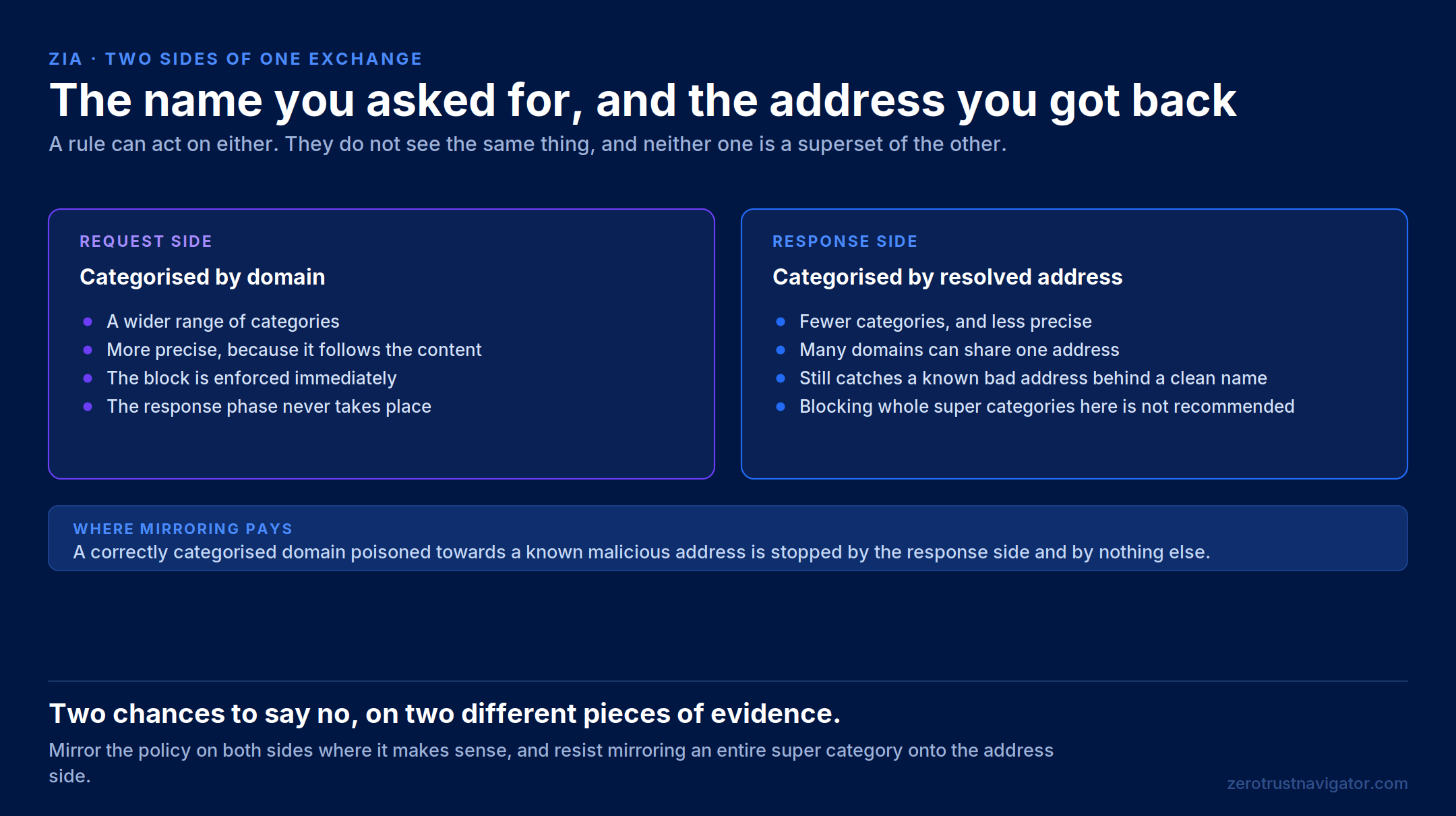
Mirroring the policy on both sides is worth doing where the categories justify it. Mirroring an entire super category onto the address side is not, because the imprecision that is acceptable for a handful of security categories becomes a blunt instrument when applied to everything at once.
Section four
Running it
11. What the blocked user actually sees
By default, nothing. A DNS block is silent, and silence is the single largest source of misdirected troubleshooting in this whole subject. The user does not report being blocked, because from where they are sitting nothing said no. They report that an application stopped working.
Three notification types exist, all configured on the individual rule, and each belongs to a different population.
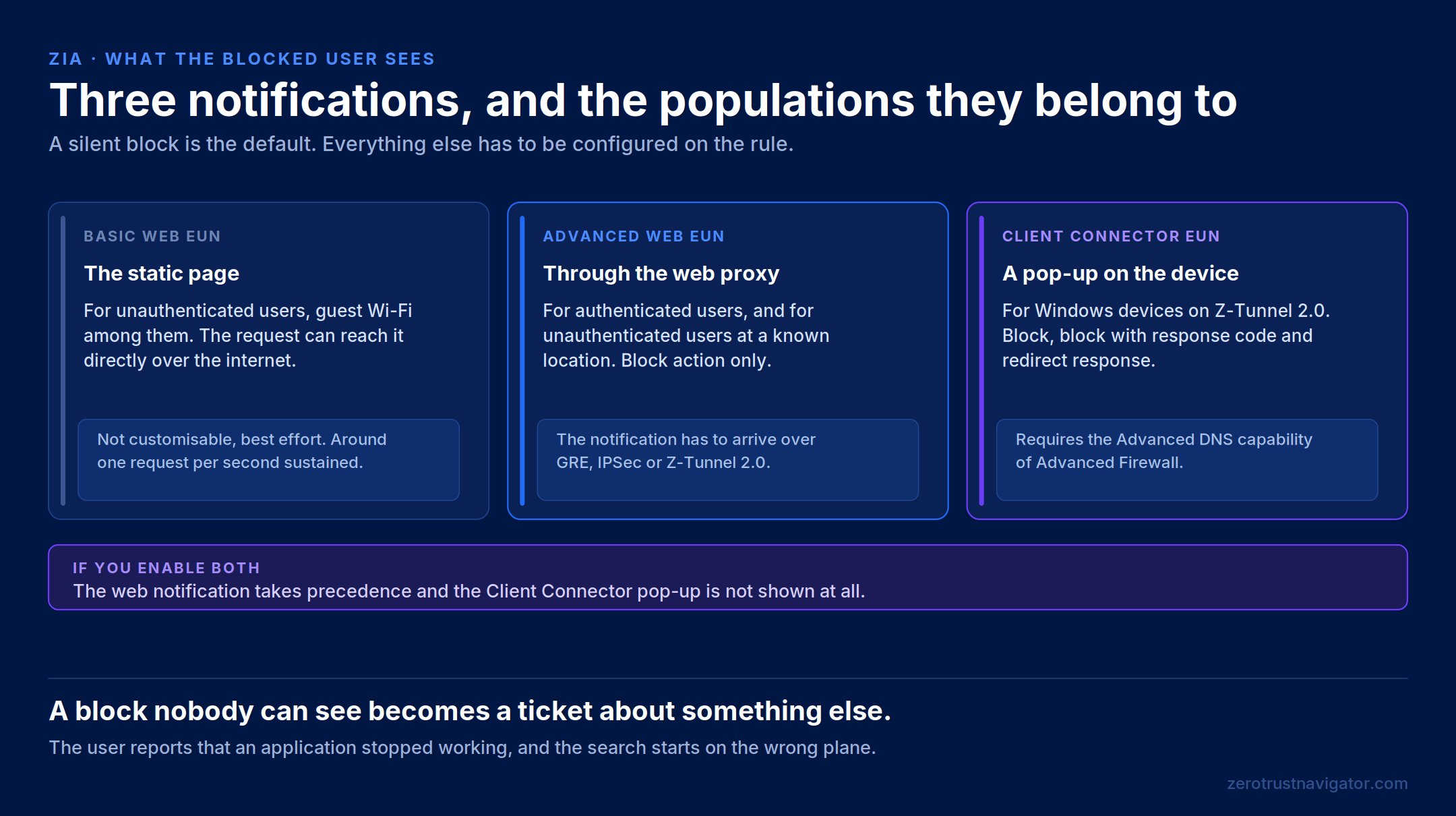
The basic web notification is a Zscaler-hosted static page, configured by putting its address in the rule. It suits unauthenticated users and guest Wi-Fi, because the request can reach it directly over the internet without traversing the platform. It is not customisable, it is provided on a best-effort basis, and organisations are advised to stay around one request per second on a sustained basis with room for a temporary increase to roughly ten.
The advanced web notification is served through the web proxy and is the recommended option for the Block action where the traffic reaches the platform over GRE, IPSec or Z-Tunnel 2.0, or from a known location. The Client Connector notification is a pop-up on the device itself, available on Windows with a recent Client Connector over Z-Tunnel 2.0, and it covers block, block with response code and redirect response.
If both are enabled, the web notification takes precedence and the Client Connector pop-up is not shown at all. Worth knowing before somebody spends a morning wondering why the pop-up never appears.
12. Rollout, and what to watch
The sequence that survives contact with a production environment is unglamorous. Verify resolution first and write no filtering rules until it is proven. Enable full logging and let the tenant collect a period of traffic before deciding anything, because the first week of DNS Insights is an inventory of the estate that no CMDB has. Start with the categories nobody argues about. Add the graylist and the record types afterwards, one change at a time, with a few days between them.
Then read the logs for what they say rather than for what you hoped. The log records which server actually answered, which is the fastest way to find out that a client you assumed was using the trusted resolver has been using something else all along. And the same field is how you tell a policy block apart from a resolution failure, which are indistinguishable from the user’s side of the screen.
Every exception on this plane needs an owner and a reason, exactly like every other bypass. A domain allowed because an application broke in March is not a decision, it is a note somebody forgot to remove.
Final thoughts
The two policy screens are not two implementations of the same idea. They act on two transactions, with two different evidence sets, at two different moments, and the earlier one can quietly remove the later one from the picture altogether.
Which is why the useful question is never whether a domain should be blocked. It is which transaction the decision belongs to, what the person on the other side will be able to see when it happens, and what else in the policy stops running once the name stops resolving.
A DNS rule is the cheapest decision in the chain and the least explainable one. Both of those are true at the same time, and a design that only remembers the first half produces tickets nobody can trace.
Two things in this article are worth verifying on your own tenant rather than taking from here. The licensing boundary around the gateway and redirect features moves with the packaging, and the behaviour of the graylist in the days after it is enabled depends entirely on what your estate happens to be running.
Sources and references
- Zero Trust Navigator — The Last Any Rule: Bringing DNS Under Inspection (Part One)
- Zero Trust Navigator — You Are Not Buying Nine Products. You Are Configuring One Decision.
- Zero Trust Navigator — The Padlock Is Not a Promise: TLS Inspection and the Controls That Depend On It
- Zscaler Help — About DNS Control
- Zscaler Help — Configuring the DNS Control Policy
- Zscaler Help — Best Practices for DNS Control Rules
- Zscaler Help — Modifying the Predefined DNS Control Rules
- Zscaler Help — Detecting and Controlling DNS Tunnels
- Zscaler Help — DNS End User Notifications
- Zscaler Help — About NAT Control
- Zscaler Help — About DNS Gateways
- Zscaler Reference Architecture — DNS Security and Control
- Figures 1 to 13: original Zero Trust Navigator diagrams.
Behaviour described here follows Zscaler’s published documentation except where explicitly noted otherwise. Product behaviour changes; verify against current documentation before relying on any of it in a design.